Summary
Weak engraving usually means a setup, optics, or focus issue. Dirty lenses and mirrors often reduce mark quality. Wrong power, speed, or resolution can flatten the result. Misalignment can make marks uneven or incomplete. On metal, the material and coating also matter. MarknStamp’s laser marking range and maintenance guidance are useful starting points.
Introduction
A weak engraving mark can halt production fast. According to the Ministry of Commerce and PIB, India’s manufacturing growth rose 5.4% year-on-year in July 2025, with IIP up 3.5%. That makes reliable marking more important than ever.
Many shop-floor teams face the same frustration. The engraving machine laser seems fine, but the metal marking machine leaves faint, uneven, or incomplete marks. That wastes time, material, and operator effort.
This guide shows the real causes first. Then it gives a simple fix order, plus prevention tips for Indian workshops. You will know what to check, what to clean, and when to call service.
What does “not engraving properly” usually look like?
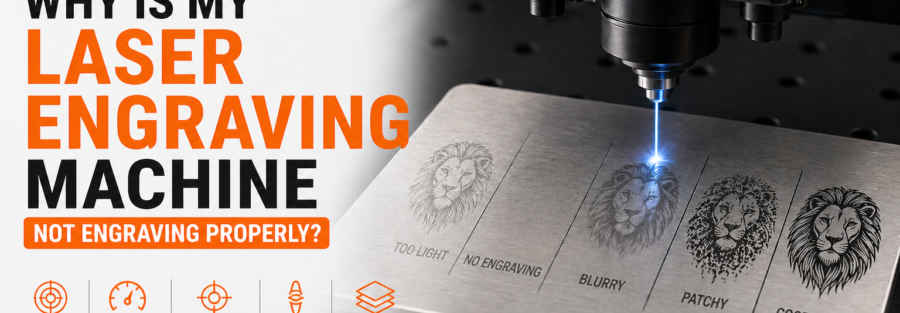
Poor engraving does not always mean total failure. It often shows up as faint marks, blurry edges, shallow depth, or uneven contrast. It may also mean the design looks correct on screen, but weak on metal.
Common symptoms include:
- Marks look too light
- Deep engraving is inconsistent
- The logo is cut off
- Text looks washed out
- One side engraves better than the other
- The machine works on one material, but not another
The symptom tells you where to look first. Faint marks usually point to focus or power. Uneven marks often point to alignment, optics, or motion issues.
Why is my laser engraving machine not engraving properly?
Most engraving problems come from a small set of causes. The machine is usually not “broken” right away. It is more often dirty, mis-set, or out of alignment.
| Likely cause | What happens | What to check first |
| Dirty lens or mirror | Weak beam, dull marks | Clean optics |
| Wrong focus | Blurry or shallow engraving | Re-set focus height |
| Power too low | Barely visible marks | Increase power slowly |
| Speed too high | Light or incomplete marks | Reduce speed |
| Misalignment | Uneven engraving | Check alignment |
| Poor material settings | Bad contrast on metal | Test a new preset |
| Blocked smoke extraction | Hazy finish, residue | Clean nozzle and exhaust path |
Dirty optics are a top suspect. Trotec says clean optics are essential for good engraving and cutting results. Epilog also warns that dirt on the processing lens can cause performance loss and poor results.
Wrong material choice can also ruin results. Epilog notes that some materials are unsafe to engrave, including PVC-based items. On metal, the surface coating and finish also affect contrast.
Which settings should you check first?
Start with the settings that most affect beam energy. That means focus, power, speed, and resolution. Trotec recommends changing one setting at a time for better testing.
Best first checks
- Re-check focus height
- Clean the lens and mirror
- Lower speed slightly
- Raise power in small steps
- Test on scrap metal first
- Save the working preset
- Confirm the file is not too light or thin
On metal, a tiny setting change can matter a lot. That is why one test sheet can save a full batch. If the mark improves after one change, you have found the issue.
Simple settings comparison
| Setting issue | Typical result | Fix |
| Power too low | Faint mark | Increase power gradually |
| Speed too high | Shallow engraving | Reduce speed |
| Focus off | Blurry or weak mark | Re-focus the head |
| Resolution too high | Flat detail | Use a suitable setting for the material |
For photo-style engraving, Trotec says too much power and too much resolution can flatten detail. For metal marking, the right balance matters more than maximum intensity.
How do material and machine condition affect engraving quality?
Material condition changes the result more than many buyers expect. A clean, stable metal sheet marks better than a coated, dirty, or uneven one. That is especially true for an engraving machine laser used on industrial parts.
Real shop-floor examples
A stainless-steel tag may engrave sharply. A coated aluminium panel may need different power. A dusty steel plate may produce hazy or inconsistent marks.
Machine condition matters too. Trotec says dirt on the processing lens can reduce performance and damage the device. MarknStamp also recommends regular cleaning, greasing moving parts, wear checks, and alignment.
| Condition issue | Effect on mark | Practical fix |
| Dirty optics | Reduced beam strength | Clean lens and mirrors |
| Poor extraction | Smoke residue | Check exhaust and airflow |
| Machine misalignment | Uneven marks | Re-align the system |
| Worn moving parts | Inconsistent depth | Inspect and service parts |
| Wrong material preset | Poor contrast | Use a tested preset |
In Indian workshops, dust control matters a lot. Trotec stresses regular optics cleaning and proper extraction. That makes a practical difference in busy manufacturing spaces.
How do you fix the problem step by step?
Use a simple order. Do not jump straight to replacing parts. Most problems resolve earlier in the checklist.
Step-by-step fix list
- Stop the job and save the file
- Clean the lens, mirror, and head area
- Check focus height again
- Run a small test on scrap metal
- Reduce speed or increase power slightly
- Verify extraction and air assist
- Check alignment if the mark stays uneven
- Repeat only one change at a time
If the result improves after cleaning, the issue was likely contamination. If one side still marks weakly, alignment is more likely. If all marks stay shallow, settings or beam output need attention.
Contextual CTA: If your metal marking machine still underperforms after these checks, talk to expert and request a demo test on your own material. That is the fastest way to confirm the right setup.
When should you call service or replace parts?
Call service when the basic checks fail. That is the point where optics, alignment, or hardware may need repair. Do not keep running a weak machine for days.
| Warning sign | What it may mean | Next move |
| Mark still faint after cleaning | Beam or setting issue | Service check |
| Repeated uneven depth | Alignment issue | Recalibrate |
| Strange residue or smoke build-up | Extraction issue | Inspect airflow |
| Poor result on every material | Hardware issue | Test beam output |
| No improvement after tuning | Deeper fault | Call technician |
MarknStamp’s own maintenance guidance supports regular cleaning, lubrication, wear inspection, and alignment. That means preventive service is part of normal machine care, not a sign of failure.
For Indian buyers, local support matters too. MarknStamp lists India-based offices and service contact details on its site. That can reduce downtime when a machine needs attention.
What are the best prevention tips for Indian workshops?
Prevention is cheaper than downtime. That is especially true for MSMEs and busy production units. India’s manufacturing sector is growing, so repeatable marking matters more than ever.
Prevention checklist
- Clean optics daily
- Check focus before each batch
- Keep the work surface flat
- Use the right material preset
- Save validated settings
- Maintain extraction and airflow
- Schedule regular alignment checks
- Keep a scrap test piece nearby
MarknStamp also talks about smarter marking systems and long-term traceability. That is useful for automotive, engineering, medical, and defence users. Those industries need marks that stay readable after handling and transport.
For voice-style searches, the answer is simple. “Why is my laser engraving machine not engraving properly?” Usually, it is focus, cleanliness, settings, or alignment.
FAQs
Why is my laser engraving machine leaving faint marks on metal?
The most common causes are dirty optics, wrong focus, low power, or speed that is too high. Start with cleaning, then test one setting at a time.
Why is the engraving uneven across the part?
Uneven engraving usually means alignment trouble, a tilted workpiece, or inconsistent surface height. Re-level the bed and check the machine alignment before changing the design.
Can dirty lenses really affect engraving quality?
Yes. Both Trotec and Epilog say dirty optics reduce performance and lead to poor results. Cleaning the lens and mirror is one of the first fixes to try.
Should I increase power or reduce speed first?
Change one variable at a time. Trotec recommends adjusting settings step by step. In most cases, a small power increase or speed reduction improves the mark.
Is every metal suitable for laser engraving?
No. Metal type, coating, and finish all affect the result. Some materials also require different marking methods or settings, so test on scrap first.
Conclusion
A laser engraving machine that marks badly is usually not beyond repair. It is usually suffering from focus, optics, settings, or alignment issues. Those are the first things to check on any engraving machine laser or metal marking machine.
For Indian workshops, the best approach is disciplined maintenance. Clean the optics. Test the settings. Verify the material. Then service the machine only when the basics fail.
If you need a reliable industrial marking partner, MarknStamp is a useful place to start. Book demo or check products to compare the right marking solution for your material and volume.