By Mark N Stamp | 9 min read
If you mark a handful of tools or one-off parts a week and nobody checks the marks, an engraving pen is enough. Once you’re marking serial numbers on customer parts, repeating the same text across batches, or adding codes that need to scan, a battery dot peen hand held engraving machine pays for itself. You get the same mark every time, whoever’s holding it.
Key insights
- A pen writes, a dot peen machine prints: with a pen, the mark depends on the operator’s handwriting. A machine works from a typed file.
- Consistency is what customers notice: ten parts in a batch with ten slightly different serials look careless, even when they’re right.
- Codes rule pens out: you can’t hand-draw a Data Matrix or a QR code that scans.
- Battery means no compressor: a cordless dot peen machine fits a small shop that doesn’t run an airline.
Before you go
Count the parts you marked last month and how many of them went to a customer. If it’s more than a few dozen, or if any customer asked for a specific format, you’ve probably outgrown the pen already.
Most small workshops start with an engraving pen. It’s cheap, it’s small, it lives in a drawer, and it does the job for marking your own tools or the odd part.
Then the work changes. A customer wants serial numbers on every bracket. Another one sends a drawing with a font, a character height and a position. Someone asks if you can add a QR code. Suddenly the pen in the drawer feels like the wrong tool, and you’re looking at machines you’ve never priced.
Let’s compare the two honestly: what each one does well, where each one falls short, and how to tell which one fits your shop right now.
What’s the actual difference between the two?
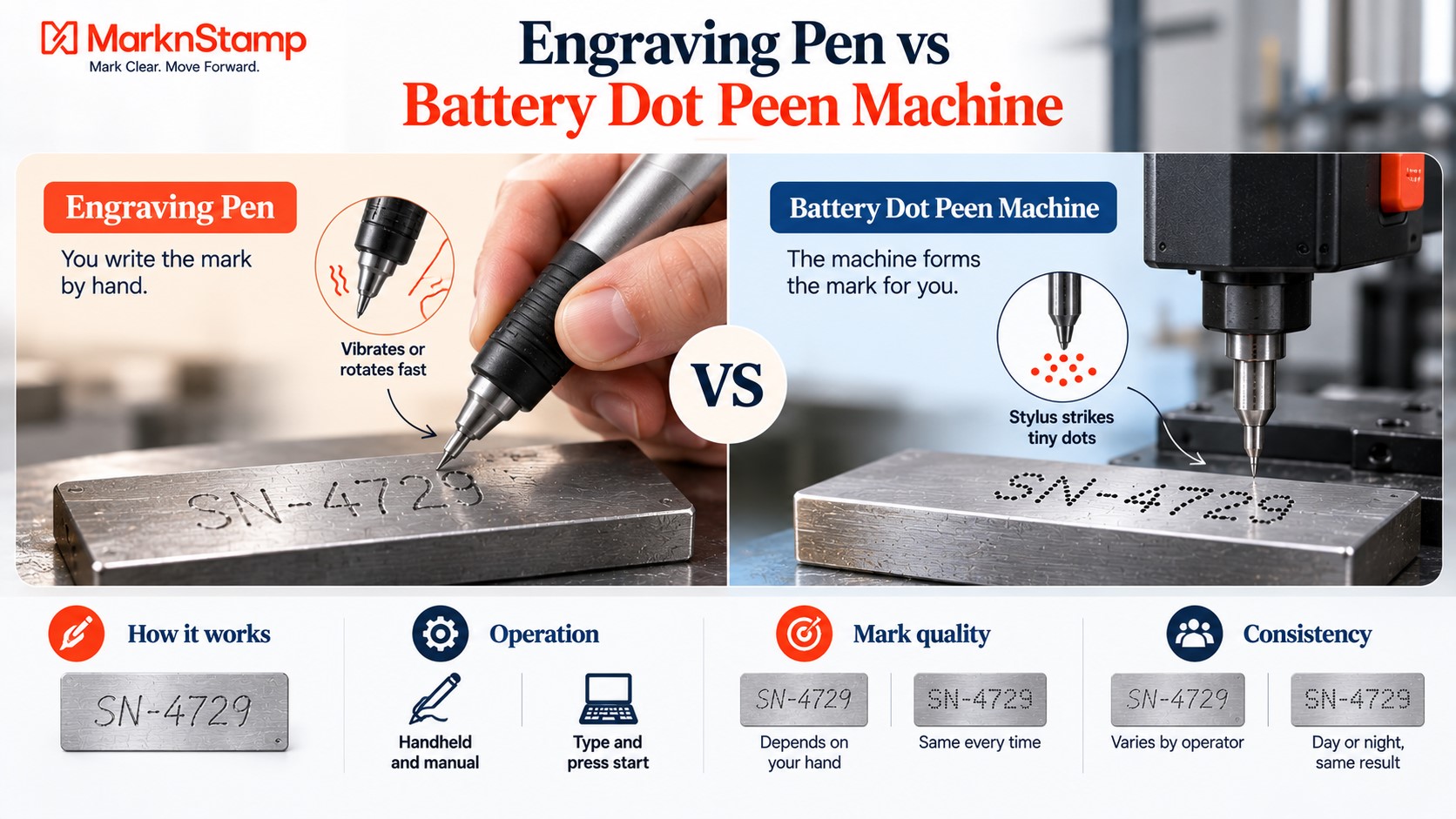
They both leave a permanent mark on metal, but they work in completely different ways.
The engraving pen
An engraving pen has a hard tip that vibrates or rotates fast. You hold it like a pen and write. The mark is as neat as your hand is steady, and every character is drawn freehand.
The battery dot peen machine
A dot peen machine has a stylus that strikes the surface in fast, tiny dots, moved by motors along X and Y axes. You type the text or load a file, place the machine on the part and press start. The machine forms the characters, not your hand.
Why that difference matters
With a pen, quality depends on who’s holding it and how their day is going. With a machine, the twentieth part looks the same as the first, and the night shift’s marks match the day shift’s.
| Feature | Engraving pen | Battery dot peen machine |
| How the mark is made | Freehand writing | Motor-driven dots from a file |
| Consistency | Depends on the operator | Same every time |
| Fonts and sizes | Whatever you can write | Selectable in software |
| 2D codes | Not possible | Data Matrix and QR on suitable models |
| Speed on a serial number | Slow, character by character | Fast once set up |
| Skill needed | Steady hand | Basic software use |
| Power | Mains or battery, depends on model | Battery |
Where does an engraving pen still make sense?
A pen isn’t useless, and you don’t need to throw it out the day you buy a machine.
Marking your own tools
Initials on a spanner, a number on a drill case, a name on a gauge. Nobody inspects these, so a pen is fine.
One-off and odd jobs
A single repair part, a sample or a prototype that’ll never be repeated. Setting up a machine for one mark can take longer than just writing it.
Very curved or awkward spots
A pen can reach into tight spaces where a machine head won’t sit flat. For those, it’s a useful backup.
Where does a pen start causing problems?
This is usually where shops realise it’s time to move on.
Customer-facing serial numbers
When a customer receives a batch, they see every mark side by side. Handwritten serials with uneven heights and spacing look unprofessional, even if they’re perfectly readable.
Matching a drawing
Many drawings specify character height, font and position. You can’t hit those reliably by hand, part after part.
Hard materials and operator fatigue
Writing on hardened steel with a pen is slow and tiring. Holding a vibrating tool for long stretches isn’t great for hands either. The UK’s Health and Safety Executive explains that regular use of vibrating hand tools can lead to hand-arm vibration problems, so long pen sessions aren’t something to plan a shift around.
Codes
If anyone asks for a Data Matrix or QR code, a pen is out. Codes need precise dot placement that only a machine can deliver.
What does a battery dot peen machine bring to a small shop?
Here’s what changes when you make the switch.
Every mark comes from a file
You type the serial once, and the machine marks it exactly. For batches, sequential numbering means you’re not keeping count in your head.
No compressor needed
A lot of small workshops don’t run a compressed-air line. A battery machine doesn’t need one. Charge it, carry it, mark.
Depth you can control
Mark N Stamp’s battery-operated MNSB-53 and MNSB-155 have nine force settings, so you can go light on thin sheet and deeper on solid bar without changing the machine. The MNSB-53 runs up to 8 hours of normal working on its lithium battery.
Control from a phone or a built-in screen
The MNSB-53 and MNSB-155 work through an app on Android, iOS or Windows. The MNSB-TC has a 7 inch touch screen built into the head, so you don’t need a phone or laptop at all, and it supports barcode scanning to import content.
How do the three Mark N Stamp battery models compare?
If you’re going down the battery route, here’s how the three hand held options line up.
| Model | Marking area | Control | Battery | Best for |
| MNSB-53 | 50mm x 30mm | App on phone, tablet or PC | Up to 8 hours normal working | Small parts, short serials |
| MNSB-155 | 150mm x 50mm | App, multi-user interface | Lithium battery | Longer strings, harder surfaces |
| MNSB-TC | 100mm x 30mm | Built-in 7 inch touch screen | Up to 4 hours normal working | Shops that don’t want a separate device |
Picking by part size
Measure your longest serial or text line. If it fits inside 50mm, the MNSB-53 is the compact choice. If it’s longer, look at the MNSB-TC or the MNSB-155.
Picking by who operates it
If several people share the machine and nobody wants to pair a phone, the built-in screen on the MNSB-TC makes life simpler.
What about hard and soft materials?
Material makes a difference to both tools, and more to the pen.
Hardened steel
A pen struggles on hardened steel and needs lots of passes. A dot peen machine handles it better because the stylus strikes with force rather than scratching. Indentation hardness is basically a material’s resistance to that kind of permanent dent, so the harder the steel, the bigger the gap between the two tools.
Aluminium and brass
Both tools mark softer metals easily. On a dot peen machine, drop the force so you don’t dent thin sections.
Painted or coated parts
A pen scratches through coatings unevenly. A dot peen machine punches cleanly through each dot, which gives a neater result.
How do you know it’s time to switch?
Look for these signs in your own shop.
You’re redoing marks
If parts come back or get redone because a mark was crooked or unclear, that time adds up fast.
Customers are specifying formats
Once drawings start listing font, height and position, you need a machine to hit them every time.
Volume is creeping up
Writing ten serials is fine. Writing two hundred a week isn’t, especially on hard steel.
Someone asks for a code
The first request for a QR or Data Matrix code is usually the moment the decision makes itself.
| Your situation | Pen | Battery dot peen |
| Marking your own tools | ✓ | Overkill |
| One-off repair parts | ✓ | Fine if already owned |
| Customer serial numbers | Risky | ✓ |
| Drawing specifies font and size | ✗ | ✓ |
| QR or Data Matrix codes | ✗ | ✓ |
| No compressed air in the shop | ✓ | ✓ |
How do you get a clean start with a new machine?
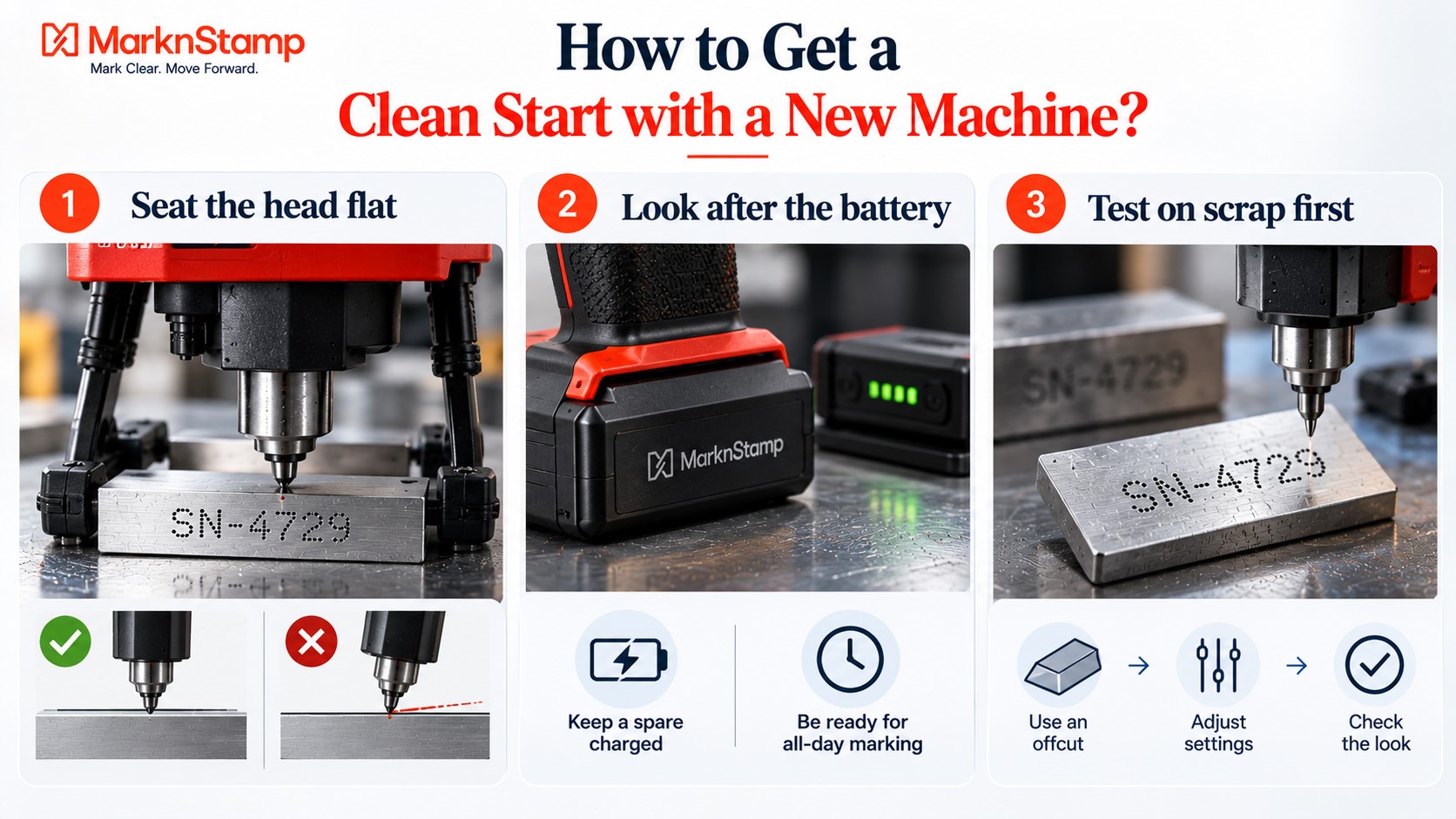
A dot peen machine is easy to learn, but a few setup habits help from day one.
Seat the head flat
The machine’s nose should sit flush on the part. If it rocks, depth changes across the mark. Mark N Stamp’s guide to setting up a hand held engraving machine with the right stylus, front fixture and resting legs covers this step by step.
Look after the battery
Keep a spare charged if you mark through the day. The tips on getting more out of portable marking machine batteries are worth a quick read before you settle into a routine.
Test on scrap first
Run your first job on an offcut of the same material. Adjust force, check the look, then move to real parts.
Wrapping up
An engraving pen is a handy tool for a shop that marks its own kit and the occasional one-off. It stops being enough the moment marks go to customers, need to match a drawing, or have to be scanned.
A battery dot peen hand held engraving machine gives a small workshop consistent, professional marks without a compressor or a dedicated marking station. It’s also the step that opens the door to codes and batch numbering when customers start asking.
If you’re on the fence, send Mark N Stamp a couple of your typical parts and the text you need on them. Seeing your own serial come out of the machine is usually the quickest way to decide.
FAQs
Is an engraving pen good enough for marking metal parts?
For your own tools and occasional one-off parts, yes. For customer serial numbers, batches or anything that needs a specific font, size or a scannable code, a dot peen machine gives far more consistent results.
Can a battery dot peen machine mark QR codes?
Many dot peen machines can mark 2D codes like Data Matrix and QR. Check the specific model’s software and marking window before buying, and test with your own scanner on your actual parts.
Do I need a compressor for a dot peen machine?
Not for a battery-operated one. Machines like the MNSB-53, MNSB-155 and MNSB-TC run electrically on a lithium battery. Pneumatic models need a compressed air supply, apart from the wireless MNSBP-145.
How long does a battery dot peen machine run on one charge?
It depends on the model and how hard it’s working. The MNSB-53 is rated for up to 8 hours of normal working, and the MNSB-TC for up to 4 hours. Deep marking drains batteries faster.
Is a dot peen machine hard to learn?
Not really. If you can type text into an app or a touch screen, you can run one. Most of the skill is in seating the machine flat and picking the right force for the material.
Which hand held engraving machine is best for a small workshop?
For short serials on small parts, the compact MNSB-53. For longer text, the MNSB-155. If you’d rather not use a phone or laptop, the MNSB-TC has a touch screen built into the head.